

SAP EWM RFUI Validation and Verification Profile
- Isha Arora
- Apr 20
- 5 min read
Updated: Apr 30
In this post, let's understand practically how the configuration for validation and verification profile impacts RF processing in a warehouse in SAP EWM. In business
context, warehouse teams sometimes request for enabling or disabling fields (such as source bin or destination bin) during scanning for receiving or picking to align with their actual warehouse processing.
We will understand this in three steps:
Check RF transaction for picking (/SCWM/RFUI)
Check configuration for validation and verification profile
Execute Picking in RF transaction in 2 ways:
Enable verification profile for a warehouse, and
Then disable verification for a field at validation profile level which is warehouse independent
Log on to RF and check logical transaction for Picking
Go to transaction /SCWM/RFUI
Outbound Process -> Picking - > Picking by WO : Scan WO and press enter, create a Pick HU and click Next
When the next screen appears, click Control + Shift + F1 to check details related to this logical transaction:
Logical transaction: PIBWHO
Step: PIMTTO
Screen Program: /SCWM/SAPLRF_PICKING
Screen Number: 501

Check configuration for Validation Profile
Go to SPRO -> SCM Extended Warehouse Management->Extended Warehouse Management->Mobile Data Entry->Radio Frequency (RF) Framework->Define Steps in Logical Transactions

Define Validation Object
A Validation Object represents the application object (for example, product, handling unit, or bin) that is required to be validated or verified in a radio frequency (RF) transaction. These validation objects are defined under configuration 'Define Steps in Logical Transactions' -> 'Define Validation Objects'.
Define Logical Transactions
As seen in RF transaction screen above for picking by warehouse order, the following validations were enabled for source bin, available quantity, and destination HU in
Logical transaction: PIBWHO
Step: PIMTTO
Select PIBWHO as the logical transaction and navigate to Define Validation Profile.
In case the validation profile is not defined for PIBWHO, it is likely that it is defined at PI**** logical transaction level.
PI**** is the logical transaction for all picking transactions so the validation profiles and transaction step flow are decided at this level and inherited by all other picking transactions such as Picking by WO, or Picking by HU.

Let's first check the logical transaction step flow to find step PIMTTO, the screen it is mapped to, and then look at the validation profile maintained
Define Logical transaction step flow

Logical step PIMTTO, linked to the PBO function module for the INIT (initial) processing step, is defined here for logical transaction PI****
Map Logical Transaction Step to Sub-Screen
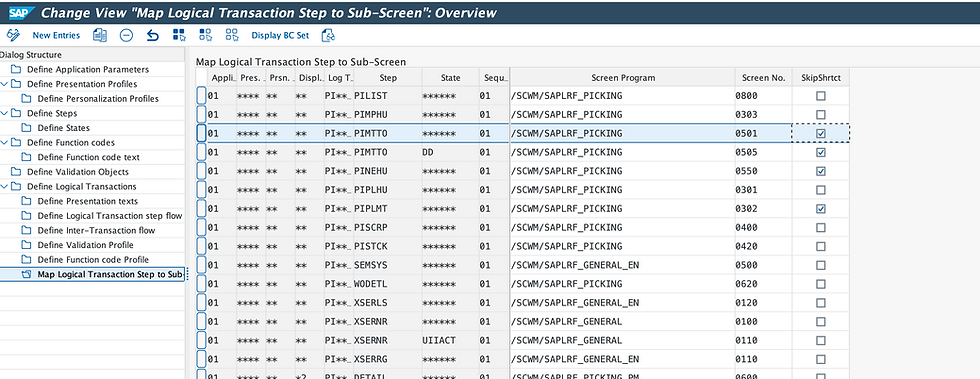
Logical step PIMTT0 is linked to screen number 0501 and screen program /SCWM/SAPLRF_PICKING
Open transaction SE51 for screen painter
Input program /SCWM/SAPLRF_PICKING and screen number 0501 noted above

Click on display
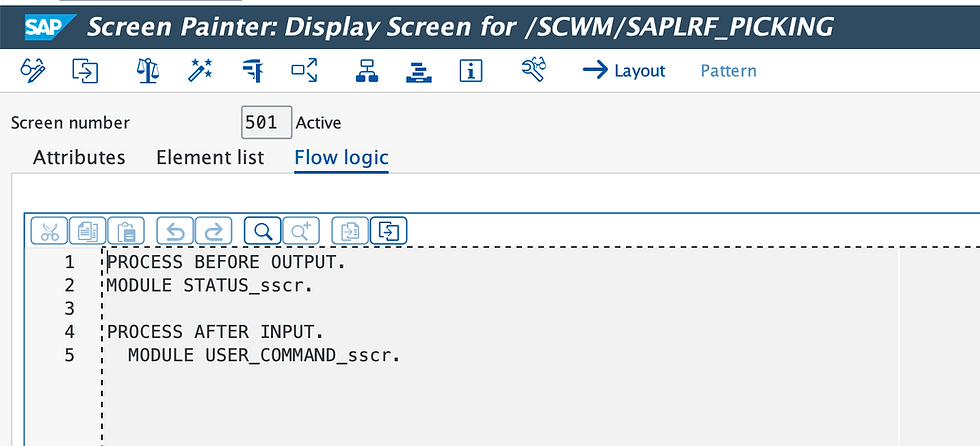
Go to layout

This layout shows you all the fields defined for this picking screen such as source bin, source HU etc. Using configuration we can enable validation and verification for only these fields that have been defined for screen 0501. In case, business team requires us to validate and verify batch as a field on this screen then that field will have to be developed for the screen first in order to configure it in EWM thereafter. Only then the warehouse woker can scan Batch and verify it.
Define Validation Profile
Switch to configuration under SPRO > Define Steps in Logical Transactions > Define Validation profile
Check this for the logical transaction PI**** and Step PIMTT0

In validation profile, we define the fields for which we want to validate the values such as HU, bin etc. The validation profile is specific to a step, and the field must also be defined on the screen linked to that step.
In this case, all validation objects with Verif. Fld ticked are configured to trigger verification at warehouse-independent level as validation profile is configured at warehouse independent level; but whether verification actually fires at runtime also depends on the warehouse-specific Verification Profile which we will cover later in this post.
If Disable is ticked for a validation object, it is fully deactivated at warehouse-independent level and verification will not fire, regardless of what the Verification Profile specifies for a specific warehouse.
Check Configuration for Verification Profile
SPRO> SCM> Extended Warehouse Management> Mobile Data Entry>Verification Control>Define Warehouse-Specific Verification
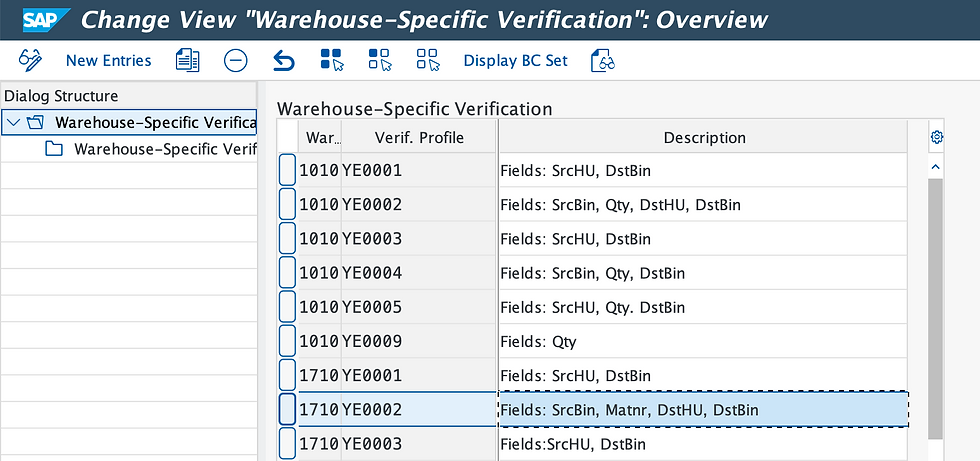
Verification controls help us determine if the warehouse operators are scanning the right fields during processing in RF. Here, a verification profile has been maintained specific to warehouse 1710, using the following validation objects.
Verification Profile: YE0002
Validation Object : Source bin, Qty, DstHU, DstBin
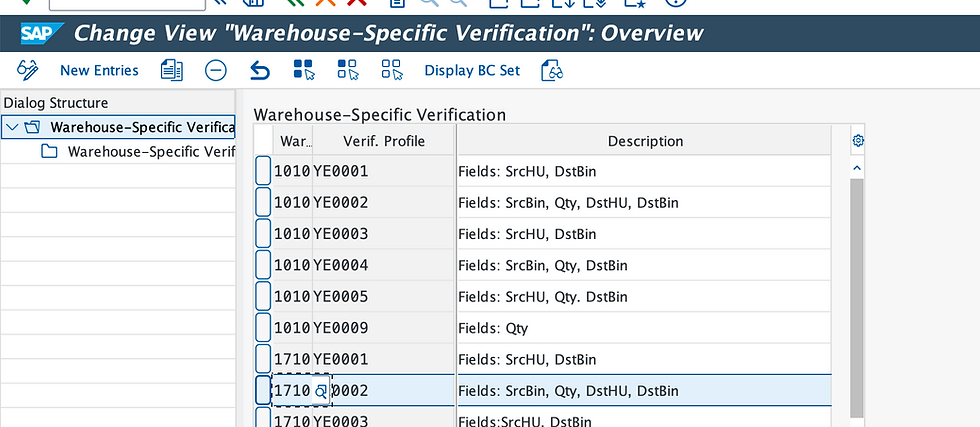
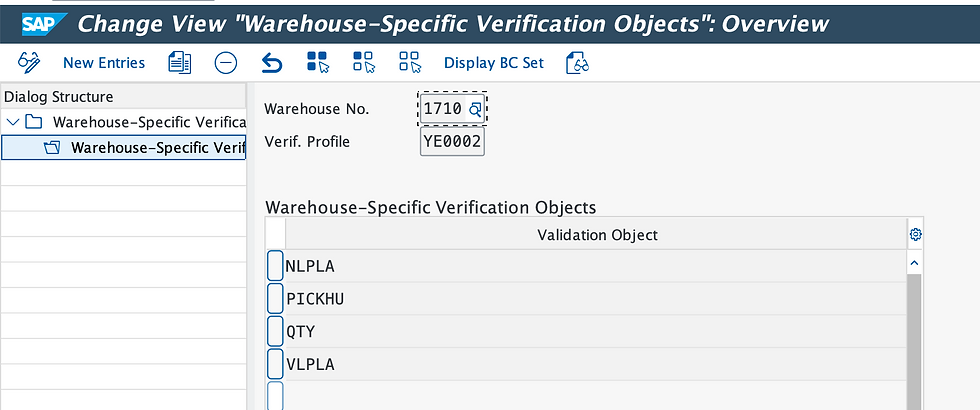
Change this configuration to add material and remove quantity from the validation objects in verification profile YE0002
Verification Profile: YE0002
Validation Object : Source bin, Material, Dst HU, DstBin

SPRO> SCM> Extended Warehouse Management> Mobile Data Entry>Verification Control>Define Warehouse-Specific Verification Determination
Verification profile is determined here on the basis of stock removal process category, activity area Y021 (storage type where picking is done from) and warehouse 1710.
This means verification behaviour can differ by storage type within the same warehouse for example, applying stricter bin and material verification in a high-value picking area versus a bulk area.

We also maintained access sequence for the determination in the subnode for configuration below

Execute Picking in RF transaction in 2 ways:
Enable verification profile for a warehouse
To reiterate the configuration setup, a validation profile for all possible fields is enabled for step PIMTTO and then a verification profile YE0002 has been maintained for warehouse 1710 with the fields below.
Verification Profile: YE0002
Validation Object : Source bin, Material, Dst HU, DstBin
Log on to RF using /scwm/rfui and go to Outbound process and Picking by Warehouse Order, input warehouse order and press Enter to proceed onto next screen, create a Pick HU and click Enter to reach step PIMTTO in logical transaction PIBWHO. Confirm picking by warehouse order. Scan source bin, product and destination HU. Click Enter
Notice, user is required to scan source bin, product, destination bin and destination HU. Qty is not enabled to be scanned as part of this verification profile in warehouse 1710.


On the next screen, confirm the task to the destination bin by scanning Destination bin and Destination HU.
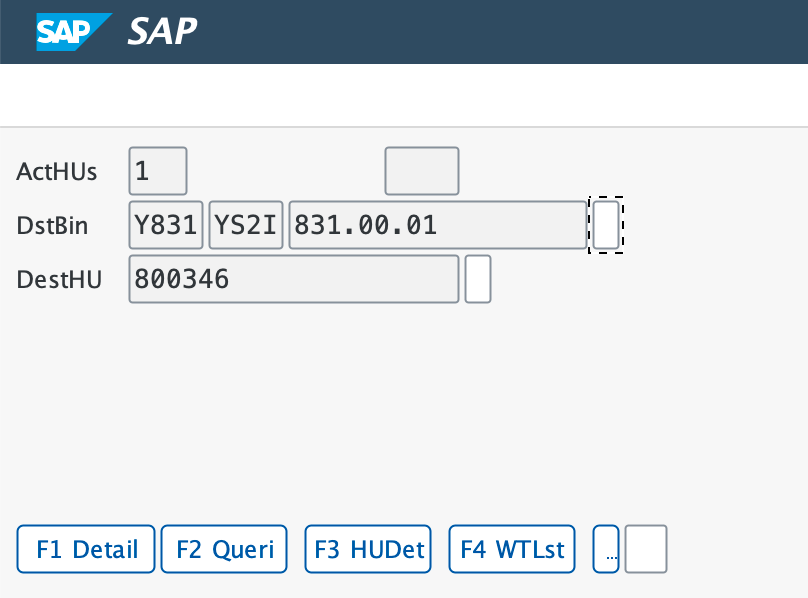
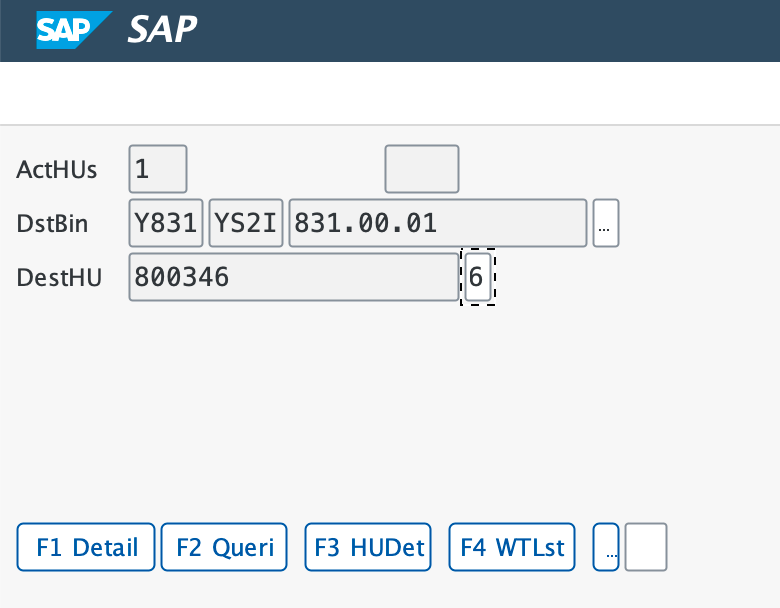

Upon confirming the picking task, the warehouse worker is taken to the initial screen to enter the next warehouse order.
Alternatively, had we enabled the Qty field in YE0002 verification profile and disabled material, then the RF screen would have asked the user to scan quantity and not material as shown below:
Verification Profile: YE0002
Validation Object : Source bin, Qty, Dst HU, DstBin

RF screen for picking by warehouse order is enabled for verification for quantity, instead of material in this case

Disable verification for a field at validation profile level which is warehouse independent
To recap the configuration setup for the verification and validation profiles:
Verification Profile
Verification Profile: YE0002
Validation Object : Source bin, Material, Dst HU, DstBin
Here, the operator is required to scan the material, source bin, destination bin, and destination HU in warehouse 1710.
Validation profile
We have disabled verification for Material ID at the warehouse-independent level in the validation profile.
Note that setting this to Disabled will have a global impact across all warehouses in your landscape.

Execute picking in picking by WO

System disables scanning for material even though a verification profile YE002 is enabled in warehouse 1710 and material is part of the validation object in this verification profile.
This was set to be disabled at warehouse independent level in validation profile, so the system does not trigger the verification check for the Material field.


Comments